
How to track brand deals in Notion without a spreadsheet
A simple four-part system for keeping every collaboration, deadline and payment in one place, using nothing but Notion's free plan.
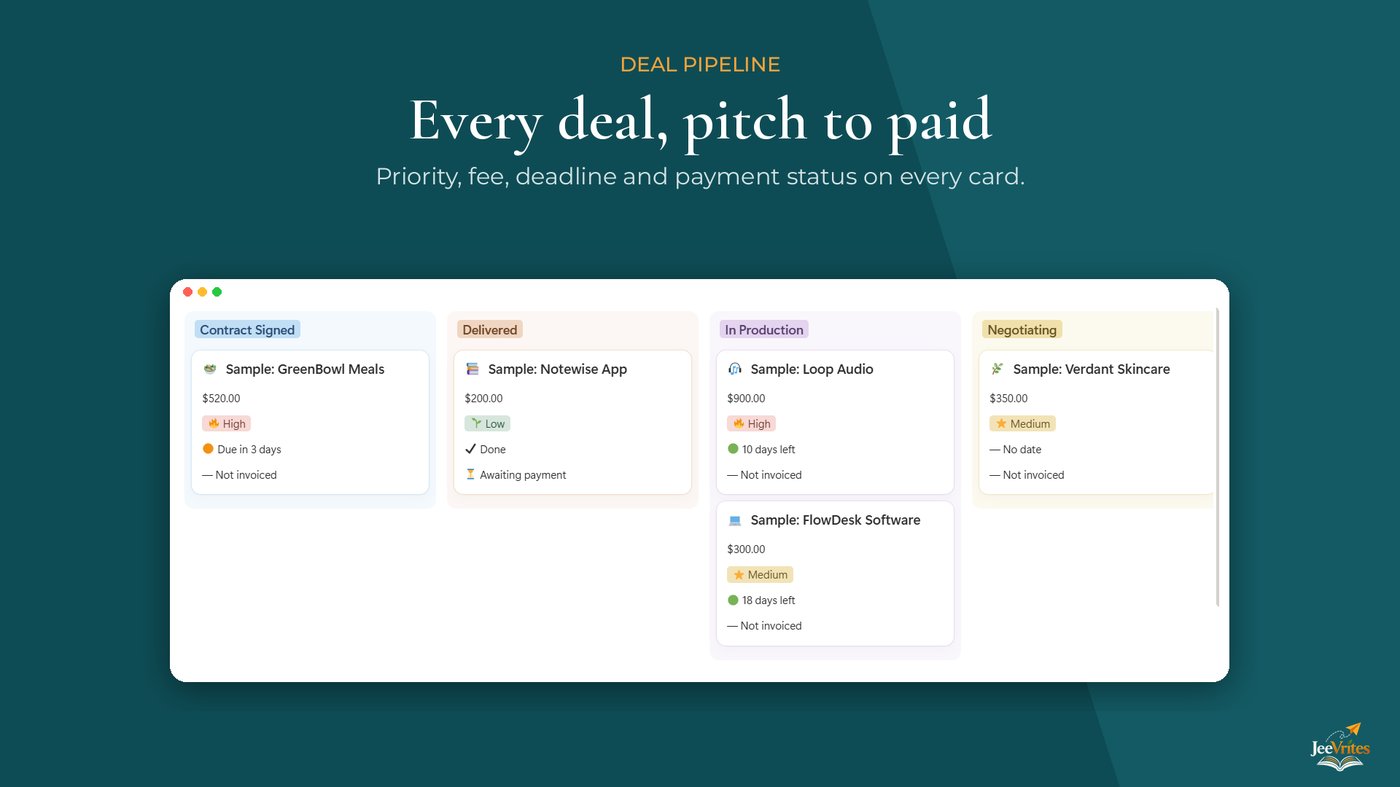
Most creators start tracking brand deals the same way: a note on their phone, a few starred emails and a spreadsheet they stop updating after the third collaboration. It works until the week two deadlines land on the same day and an invoice from last month is still unpaid.
You don’t need a complicated system to fix this. You need four things, and Notion’s free plan gives you all of them.
1. One database for every brand
Create a single database called Brand Deals. Every brand you pitch or hear from becomes one row, even if nothing comes of it. Give it these properties to start:
- Stage, a select with Pitched, Negotiating, Contract signed, In production, Delivered, Paid and Declined
- Fee, a number formatted as currency
- Due date and Pitch date
- Contact name and Contact email
- Deliverables, a short text field such as “1 Reel and 3 Stories”
Keeping every brand in one place matters more than the exact properties. You can always add more later.
2. A board as your pipeline
Add a board view grouped by Stage. Now every deal is a card you drag from left to right as it moves forward. At a glance you can see how many deals are still at the pitching stage and how many are waiting to be paid.
Drag the columns into the order deals really move, from Pitched to Paid, and hide Declined so the board stays focused.
3. A formula for deadline alerts
This is the part that saves you from missed deadlines. Add a formula property called Deadline that reads the due date and returns a label:
- “Overdue” when the due date has passed
- “Due in 3 days” when it is within a week
- “18 days left” when you have time
- “Done” once the deal is delivered or paid
Show this property on your board cards. The labels update every day on their own, so you never have to check dates by hand.
4. Two checkboxes for money
Add two checkboxes: Invoice sent and Payment received. Then create a small list view filtered to deals where the invoice is sent but the payment isn’t received.
That one view answers the question every creator dreads: who still owes me money? Check it every Sunday and send a friendly reminder to anyone on the list.
A weekly ten minutes
The system only works if you look at it. Once a week, move each card to its correct stage, tick any payments that arrived and chase the ones that didn’t. Ten minutes is enough.
If you’d rather skip the setup, Creator Brand Deal OS has all four parts built in, plus a content calendar, a media kit page and pitch email templates. It works on Notion’s free plan too.